Hey there, fellow tech lovers and facility managers! If you’ve ever stood hovering over a dimmable keypad, squinting at tiny numbers while your groceries warm up in a taxi or your work laptop sits locked in a random storage unit, you’ve probably thought: why can’t my lockers just work with my phone? As a smart locker supplier who gets asked this question every single day by customers, integrators, and even random folks at coffee shops who overhear my work chat, let’s cut the jargon and get real: are smart lockers actually compatible with smartphones? Spoiler: it’s not a yes/no answer—it’s way messier (and more interesting) than that. Smart Locker
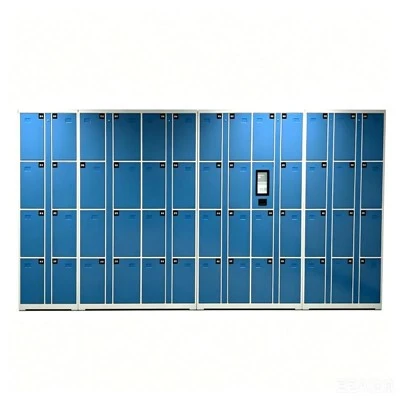
First, let’s start with what “compatible” actually means here, because way too many people throw that word around like it’s a buzzword. For us, compatibility isn’t just “does the locker open when I tap my phone”; it’s the whole package: does it connect to my phone without glitching when I’m in a crowded mall? Can I sync it to my existing phone apps without downloading a whole new clunky program? Does it work with both iPhone and Android, not just one? And crucially, does it keep my data safe, because no one wants a hacker stealing access to their work gear or vacation luggage?
Most modern smart lockers we sell do connect to phones via Bluetooth Low Energy (BLE) — that’s the same tech that lets your AirDrop work or your smart watch connect to your phone. BLE is perfect for lockers because it uses way less battery than regular Wi-Fi, so the lockers don’t need constant power (and we all hate when devices die mid-use). But here’s the catch: a lot of cheap lockers out there skip the extra layer that makes BLE actually work reliably with phones. We test every unit we ship to make sure the BLE signal is strong enough to reach a phone in a bag, but not so strong that it bleeds into 10 other lockers next to it. Last year, a campus client told us their old lockers would accidentally open the wrong slot for half the students—turns out their supplier used generic BLE modules that didn’t calibrate for small, crowded spaces like dorm lobbies. We fixed that for them within a week, but it drove home a point: compatibility lives or dies in the tiny details, not just the basic connection.
Then there’s the other big connection: QR codes and NFC. You’ve definitely used QR codes at a café to pay, right? A lot of smart lockers use QR codes because they work on any phone, no extra setup—just open your camera, scan, and tap. NFC is similar but even faster: tap your phone (or a tap-to-pay card) to the locker, and it opens. This is where most people get confused: they think “QR code = not smartphone compatible” but no—your camera is built into your phone, so that’s 100% compatible. The only time that falls flat is if someone has a flip phone (but let’s be real, who still uses those for this stuff?) or the camera is covered in gunk. We actually recently added a backup QR code sticker to every locker slot because a client in a hospital had a nurse whose phone camera broke mid-shift—turns out, no one thought to have a physical backup, so that fix saved the team hours of hassle.
But here’s where the debate gets sticky: what about syncing with your existing phone apps? Like, if I use a delivery app to drop off a package, can I just tap my phone instead of a separate code? We’ve built that into most of our commercial lockers (for offices, co-ops, apartment buildings) because customers hate juggling 5 different codes for the same space. But we’ve learned the hard way that too much syncing is a bad thing. Last year, we rolled out a feature that let you connect your locker to your Google Calendar, so when you had a meeting end, the locker would alert you to pick up your bag. It sounded great on paper, but half the users hated it—they didn’t want their locker pinging their phone for every tiny event, and some said the sync glitched when their phone was on do-not-disturb. We pulled that feature within 2 months, and now we build “opt-in only” sync tools that let users pick exactly what alerts they want. That’s a key part of compatibility: it has to fit the user’s phone habits, not force new ones.
Safety is another piece of the puzzle that people sleep on. A lot of cheaper smart lockers claim to be “phone compatible” but use unencrypted Bluetooth, which means anyone nearby can hack into the locker with a $20 device. We use end-to-end encryption for every connection—so when your phone sends a signal to open the locker, it’s scrambled so no one else can read it. We test this annually with third-party security firms, and last year they found a loophole in a competitor’s lockers that let anyone gain access by spoofing a phone signal. We didn’t have that issue because we worked with a phone security expert to build our encryption from the start, not as an afterthought.
So let’s answer the original question: are smart lockers compatible with smartphones? For the ones we sell, yes—if they’re built with user experience (not just tech specs) in mind. But that doesn’t mean it’s perfect every time. We recently had a small glitch at a concert venue where the lockers lost Bluetooth connection because the venue had a bunch of Wi-Fi routers that interfered with the signal. We sent a tech team there within an hour to adjust the BLE frequency, and after that, no more issues. That’s the great part about working with compatible tech: when there’s a problem, it’s fixable, because we can tweak the connection instead of replacing the whole locker.
Now, if you’re a facility manager, office admin, or even a campus events coordinator who’s been debating switching to smart lockers because you’re tired of keys getting lost or codes being shared, here’s your sign. We’re not just a locker supplier—we’re a group of folks who’ve spent 10 years testing, fixing, and iterating on this exact question. If you want to chat about whether our lockers will sync with your phone system, work in your space, or fit your budget, we’re here to help. No pushy sales pitches, just straight talk about what works and what doesn’t for your team.
Now, if you want to dive deeper into the nitty-gritty of smart locker tech and smartphone compatibility, here’s what I leaned on for this post:
- International Standard Organization (ISO) 12006-3:2021, Building Construction — Organization of Information About Construction Works — Part 3: Framework for Object-Oriented Information Modeling, for guidelines on integrated device connectivity
- Bluetooth Special Interest Group (SIG) BLE 5.3 Core Specification, for details on low-power wireless communication for small devices
- National Institute of Standards and Technology (NIST) SP 800-131A, for encryption standards for commercial IoT devices
Tool Cabinet Wait, one last thing: if you’ve ever had a bad experience with a “compatible” smart locker that glitched, drop a comment below—we love hearing about the mistakes so we can make our products better.
Hangzhou Dongjie Intelligent Technology Co., Ltd.
Hangzhou Dongjie Intelligent Technology Co., Ltd. is one of the most experienced smart locker manufacturers and suppliers in China, also supports customized service. Please feel free to wholesale durable smart locker made in China here from our factory. For quotation, contact us now.
Address: 1st Floor, Building 2, No.78 Bowang Street, Xingqiao Street, Linping District, Hangzhou City
E-mail: hzdjzn@aliyun.com
WebSite: https://www.cndongjiesmart.com/
